Introduction To ESRI Feature Service

Idox Geospatial Ltd (trading as Emapsite) now provides ESRI proprietary Feature Services in addition to services compliant with Open Geospatial Consortium (OGC) web services. 

An ESRI Feature Service from Idox Geospatial provides read-only access to spatial and nonspatial data. Client applications can query attributes, geometry, related data, and attachments, and access and display features. These services can be added to an organization's ArcGIS Online account, allowing internal users to discover and use the feature service layer via “My Content.” By publishing or referencing the service in this way, organizations can ensure that all internal users access a single, authoritative source of data—promoting consistency and ensuring the use of the most current information. 

Welcome to the Emapsite Technical Help Site.

Thank you for purchasing this Emapsite online service, where Emapsite manages the geospatial database and datasets to leave you free to run your business.

The information provided in this site will help you get the most from the service. Everything you need to get started and interact successfully with the service should be here. And should you require anything else, please contact Customer Support:

Customer Support Telephone: 01189 973 6883
Customer Support Email: customersupport@emapsite.com
Emapsite Address The Hub
Fowler Avenue
Farnborough
GU14 7JF
United Kingdom
Emapsite Website: www.emapsite.com

Getting Started With ESRI Feature Service

Before you can access Emapsite's ESRI Feature Services, you will need the following:

  • Your API Key URL

If you are missing this it can be found in your welcome email.

Integrations

The instructions below are for connecting to Emapsite's ESRI Feature Services using ESRI Software. 

Note - The instructions are for connecting to ESRI Feature Services.

Accessing via ESRI ArcGIS

Screenshots in this section are based on ArcGIS Online (AGOL). 

You can access ESRI Feature Services from Emapsite in multiple ways: 

  • Directly from your AGOL Content page 

  • When shared through your AGOL account in ‘My Content 

  • By adding them directly to web maps 

  • By connecting through ArcGIS Pro 

To connect, you will need: 

  • Feature Service URL – Your unique service endpoint.


Option 1: Access via AGOL Content Page 


Step 1: Go to your AGOL admin account, navigate to Content, and select + New item

A blue box with white text

AI-generated content may be incorrect. 


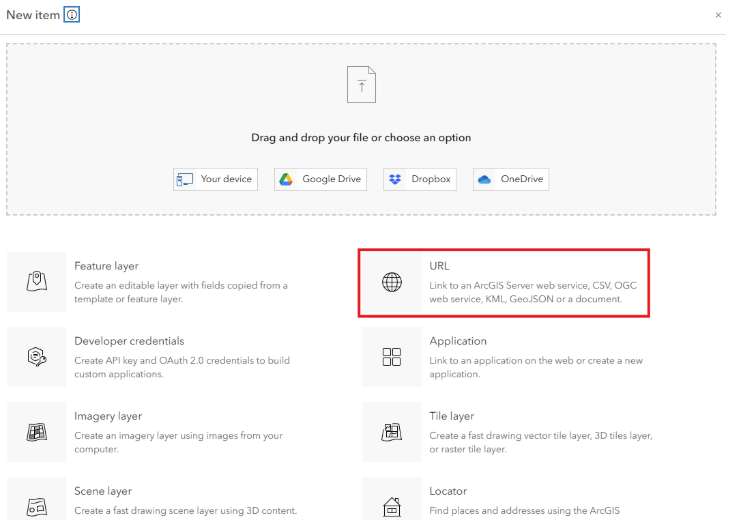
Step 2: Choose URL from the item types.

A screenshot of a computer

AI-generated content may be incorrect. 


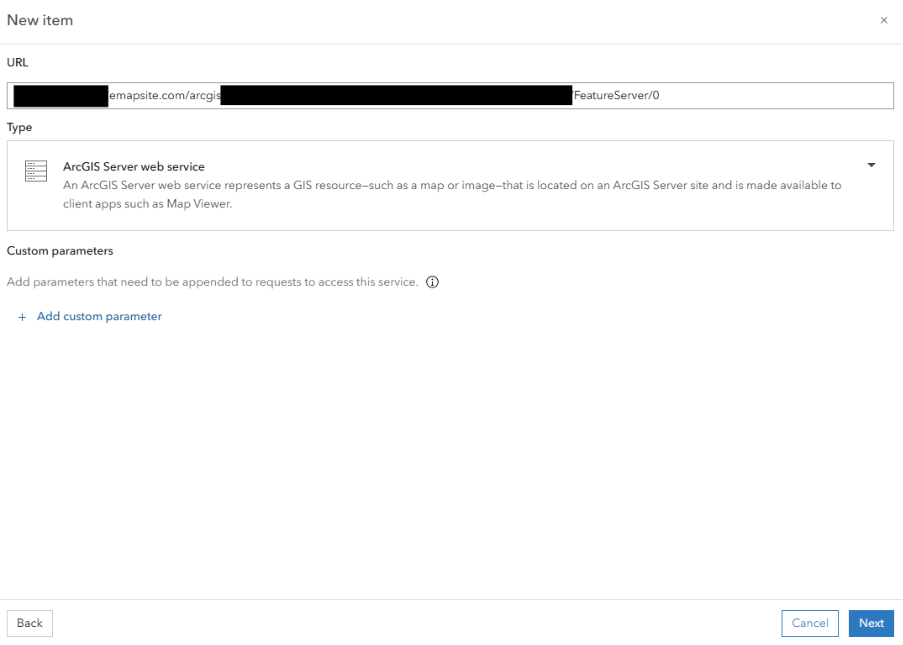
Step 3: Paste your unique Feature Service URL. 

(Optional: Add custom parameters if needed.) 

Click Next. 

A screenshot of a computer

AI-generated content may be incorrect. 


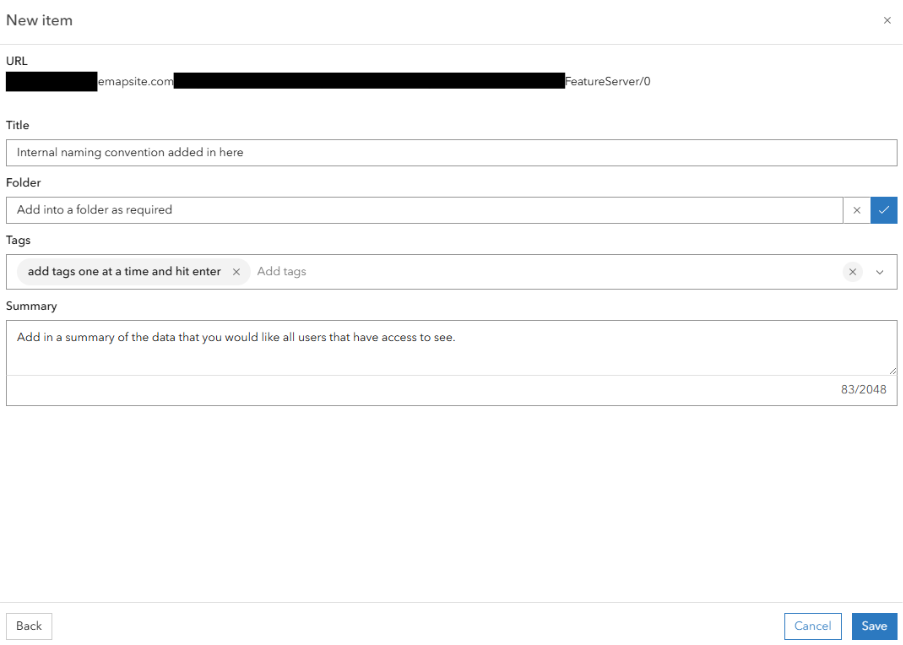
Step 4: Provide: 

  • A meaningful title 

  • Choose a folder 

  • Add tags and a summary

  • Click Save

A screenshot of a computer

AI-generated content may be incorrect. 


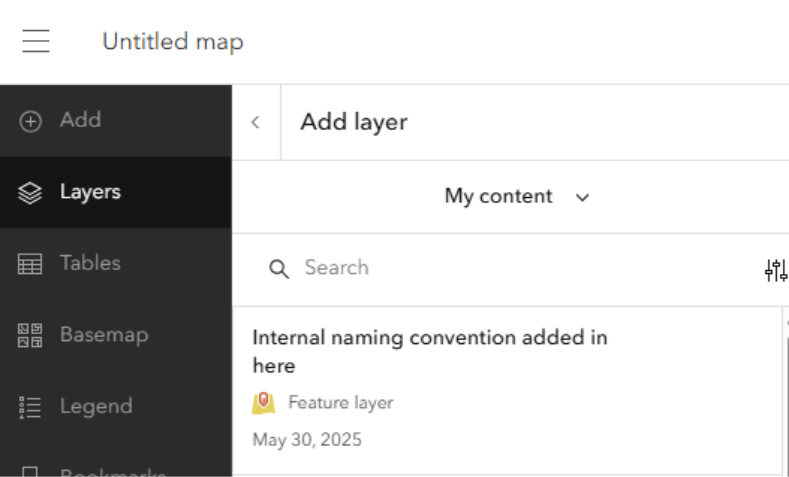
The service will now appear in your Content and can be used across your organization. It can also be added to maps and apps as follows: 

A screenshot of a computer

AI-generated content may be incorrect. 

Go to LayersAdd layerSelect from My Content 


Option 2: Access via URL in a Web Map


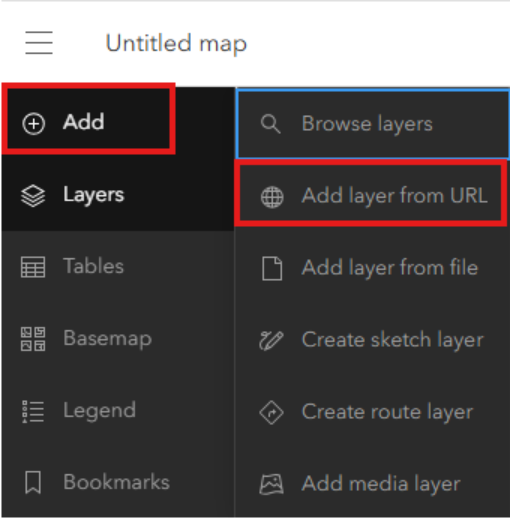
Step 1: Within a web map, click Add Add Layer from URL

A screenshot of a computer

AI-generated content may be incorrect. 


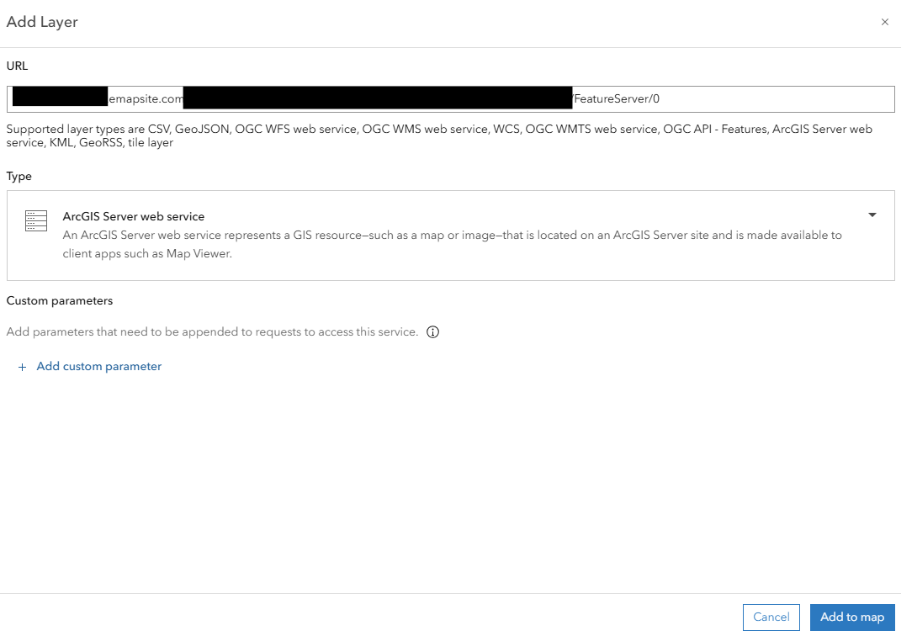
Step 2: Enter your Feature Service URL.

The type should automatically be recognized as an ArcGIS Server Web Service. 
(Optional: Add custom parameters.) 
Click Add to Map.

A screenshot of a computer

AI-generated content may be incorrect. 


Option 3: Access within ArcGIS Pro (Version 3.4.0) 


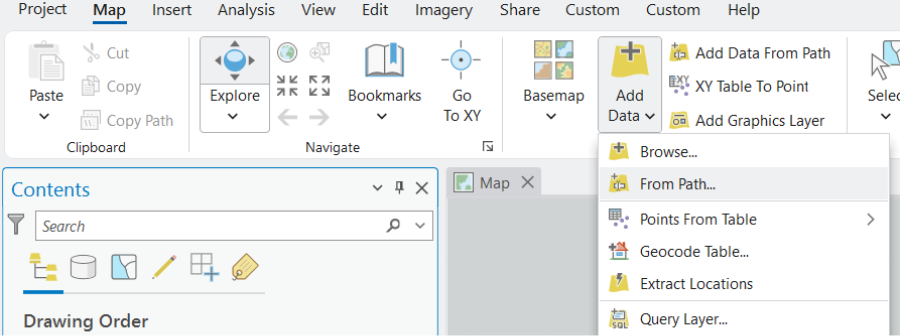
Step 1: Open a map in ArcGIS Pro and select Add DataData from Path


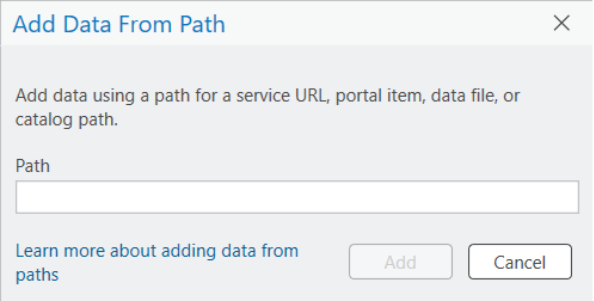
Step 2: Paste your unique Feature Service URL, then click Add 


The data will now be visible in your map window. 


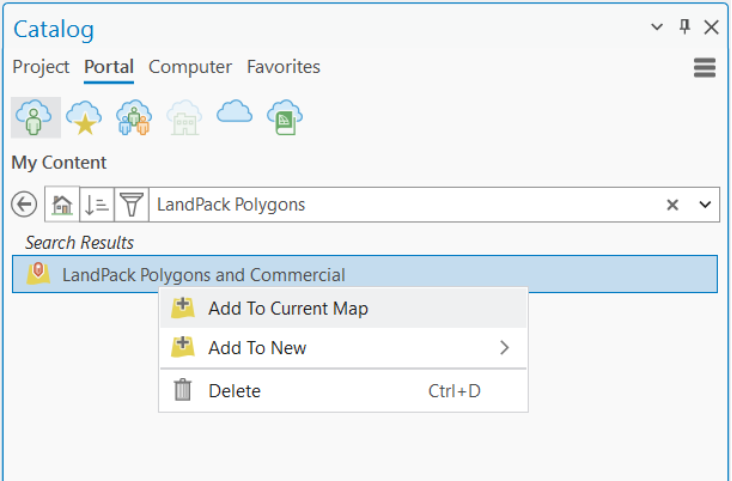
Option 4: Access a Published Feature Layer from AGOL in ArcGIS Pro 


Step 1: In ArcGIS Pro, open the Catalog Pane


Step 2: Log in to your ArcGIS Online account, then go to the Portal tab and navigate to My Content


Step 3: Locate your published layer and either: 

  • Drag and drop it into the map, or 

  • Right-click and choose Add to Map 


Datasets

The datasets available through this service are intended for use by customers with pre-existing data licences for the following datasets:

  • Ordnance Survey MasterMap
  • Emapsite LandPack Polygons with Commercial Ownership


Customer Support Telephone: 01189 973 6883
Customer Support Email: customersupport@emapsite.com
Emapsite Address The Hub
Fowler Avenue
Farnborough
GU14 7JF
United Kingdom
Emapsite Website: www.emapsite.com

FAQs

We've tried to cover all the bases, but there might still be a few questions.

Commonly Asked Questions

You should have received your unique URL in your welcome email. If you're unable to find these then contact customer support

Customer Support Telephone: 01189 973 6883
Customer Support Email: customersupport@emapsite.com

Please ensure you've copied the URL from email correctly. If you're still experiencing issues contact our customer support:

Customer Support Telephone: 01189 973 6883
Customer Support Email: customersupport@emapsite.com

The step by step guide for ESRI software is contained in the Integrations section. Please get in touch if you need assistance for other GIS platforms.

Customer Support Telephone: 01189 973 6883
Customer Support Email: customersupport@emapsite.com

You may have received one of the following errors:

  • Sorry it doesn't look like you have access to this layer... - You have attempted to access a layer that you have not licensed. Our customer support team will be happy to assist you in purchasing additional layers.
  • One or more errors have occurred - If this error persists and you are unable to identify the cause, please reach out to us for additional assistance.

If your error is not listed then reach out to our support team who will be happy to help:

Customer Support Telephone: 01189 973 6883
Customer Support Email: customersupport@emapsite.com

For customers with data licences for sub_GB coverage, our customer support team will be happy to licence additional areas as required:

Customer Support Telephone: 01189 973 6883
Customer Support Email: customersupport@emapsite.com

Known Limitations

The first time you connect, you may experience a short delay while the service initialises. Subsequent connections should perform as expected.

Rendering too many features at once can slow down client-side applications, particularly in web maps.

We restrict large queries running longer than a minute to time out to ensure system stability for all users.

Feature services published through ArcServer are known to not retain their labelling configuration. Please note this is a known limitation of the ESRI platform.  Feature Services require styling and labelling to be configured on the client side, unlike Map Services which do preserve the full visual design, including: 

  • Label placement 

  • Layer order 

  • Symbology 

  • Scale-dependent rendering 

We are planning to make Map Services available soon to support use cases where consistent styling and cartographic fidelity are important. If you’re interested in being notified when this becomes available, please let us know.

Many Feature Services have scale-dependent rendering, meaning: 

  • Layers may not appear at all zoom levels. 

  • If a layer is not visible, users should zoom in or out to the appropriate scale range. 

This is typically set for performance reasons to avoid overwhelming the map viewer. 

Most ESRI Feature Services are published in OSGB36 British National Grid (ESPG:27700). 

If your map or GIS client is using a different coordinate system, there may be: 

  • Reprojection delays 

  • Minor precision loss 

  • Misalignment with local basemaps 

Tip: Before adding our feature services, confirm that your basemap and other layers are using OSGB36 British National Grid (EPSG:27700) to ensure proper alignment and avoid reprojection issues.

Web layers containing some field types (big integer, date only, time only, or timestamp offset) may have limited functionality in certain web clients.

  • You are accessing a service provided by Emapsite not hosted within your own infrastructure. 

  • Users must not republish or redistribute the service without appropriate licensing or agreements in place. 

  • Your organization’s AGOL administrator should track usage, especially if data consumption is linked to licensing limits or commercial agreements. 

  • We recommend advising users that: 

    • They are accessing an external, read-only service. 

    • While direct downloads are not permitted, users should be aware that excessive panning, zooming, or otherwise triggering repeated access to large areas of licenced data may incur significant royalty charges if the service is priced on a transactional basis. Please ensure that all internal users understand how to use the service responsibly to avoid unnecessary costs. 

    • For data currency and availability issues, they should contact the data administrator or Emapsite support.

  • Feature Services do not inherently support offline use unless explicitly enabled for sync and replication. 

  • Users must remain online and authenticated to access the service. 

  • Services secured with unique URLs require proper integration to avoid authentication failures. 

  • URLs must be kept secure and not exposed in public web apps. 

  • Services should be used in line with the product EULA and your contracted terms with us. 

Emapsite supports access to geospatial data via ESRI Feature Services, enabling customers to query and interact with datasets through the REST API. These services provide powerful tools for spatial and attribute-based queries, filtering features, performing spatial analysis, and retrieving results in formats compatible with GIS applications such as ArcGIS. The Query and Tools endpoints allow for direct, on-demand access to individual features or subsets of data, making it easy to integrate into enterprise systems, web maps, or custom analytics workflows. For examples of how to use the Query and Tools REST service, please refer to the following link: https://developers.arcgis.com/rest/services-reference/enterprise/query-feature-service-layer/  

Emapsite APIs

Emapsite online service products comprise Open Geospatial Consortium (OGC) compliant web services and Query-API products.

These products are intended for customers who prefer to focus on their business activity and have geospatial database and datasets hosted, managed, and maintained by Emapsite professionals.

OGC Compliant Services

Emapsite introduced the first commercial OGC compliant Web Map Service in 2006 and our customers have trusted us ever since to help them make smarter business decisions:

  • Web Map Service
  • Web Map Tile Service
  • Web Feature Service

Query-API Products

These products enable customers to query the whole range of Emapsite geospatial datasets and stream responses directly into a GIS or other geospatial application. We provide unlimited access to licensed datasets from household names such as Ordnance Survey, HM Land Registry and Environment Agency, through to specialist publishers plus our own range of value-added and derived data products.

Emapsite also provides data cleansing services using artificial intelligence and machine learning techniques to improve the quality of customer-provided data (e.g. lists of addresses). A cleansed dataset underpins successful location analytics activities and further improves problem solving and decision making.

Emapsite is the trusted source of reliable mapping data and spatially enabled, business intelligence products. You will access to the wideset range of datasets and be confident that the whole team is using the same trusted data source. These services are intended to be convenient to help you gain competitive advantage by doing things faster, more consistently and with higher output.